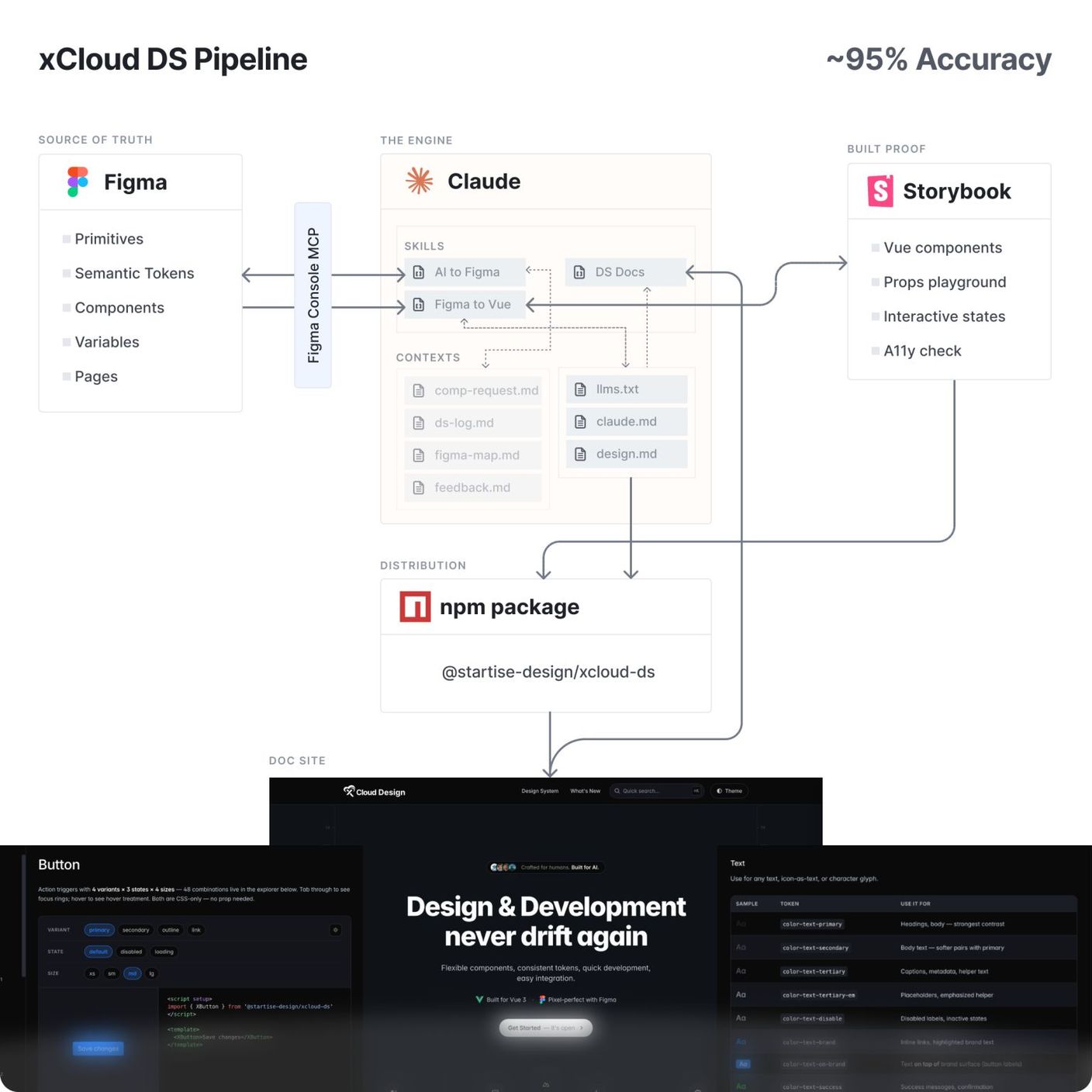
Figma MCP with Claude was never enough for us.
We build xCloud fast. But not at the cost of consistency or user experience, and AI alone couldn't hold that line.
The system worked, until AI started writing code
At Startise, we built an atomic design system for xCloud so design and dev stayed aligned. It worked fine for years.
Then AI started writing the code. With AI and the Figma MCP, our devs were building faster than ever, but the gaps showed up just as fast:
- Code drifted from the system as devs shipped fast with AI.
- The output came close to the design, but never pixel-perfect.
- Manual docs took too much time and never stayed in sync with the build.
- AI reinvented components we already had.
- It invented new ones, with no logging and no one approving them.
Each of these breaks the main reason a design system exists: design and code speaking the same language.
The pressure flipped
At the same time, designers had to ship faster too, and use AI to design directly on the canvas.
The old human-paced handoff didn't fit anymore. Our loop looked like this:
Prompt → result → manual check → prompt.
That loop was too slow for how we work now. We needed an agentic workflow, one that handles implementation, maintenance, and self-correction on its own, with docs and mapping generated automatically, all synced to one source of truth.
The missing piece was the Figma Console MCP. It can break a Figma file down in detail, and it lets AI write directly on the canvas. Grateful to TJ Pitre for building it.
One loop, four layers
So we rebuilt the flow into one loop:
- Figma is the single source of truth.
- Storybook is the built proof. Every component and every variant, in light and dark, renders live before it ships.
- Vue is what ships, as a versioned package.
- The doc site is generated automatically and stays in sync.
AI runs all of it through the Figma Console MCP, a set of custom skills, and markdown files that give it the right context: what exists, where it lives, why it's there, and the rules it can't break.
The four jobs AI does for us
1. Designing (AI → Figma)
AI designs screens on the canvas from our existing components, without breaking them. It reads the live file through the Console MCP, screenshots its own output, compares it with the design system, and fixes it until it matches. If a screen needs a component that doesn't exist yet, it can build that too, but only with permission.
2. Building (Figma → Vue)
AI pulls every property of a component from Figma through the Console MCP. Before any code ships, it produces a drift report comparing Figma and code, property by property. Then it verifies the result in Storybook.
3. Maintaining
Change a token in Figma and the change cascades through every file it touches, so nothing drifts. AI catches its own drift and corrects it before it spreads. Docs and mapping stay synced, with no manual cleanup.
4. Handoff (design → dev)
We deliver the whole system as an npm package the devs install, along with the auto-generated docs site.
What changed since
Since I first shared this workflow, the Figma Console MCP got a big update. It now ships its own extraction and scaffolding tools.
Point them at any repo and they pull tokens and components exactly as they exist, scaffold a Storybook instance wired to what they find, detect the framework on their own, and run a deterministic check to confirm the extraction holds up. Tokens come out in a standard format, so they can go straight back into Figma if that's the direction you need.
Some of my custom skills won't be doing as much work anymore. I'm fine with that. If you're setting up a design system from an existing app, or starting one from scratch, this is the part that used to take real hours by hand. Now it doesn't.
Not a new invention
None of this is a new invention. Plenty of teams are getting here, and some do it better. We built it for the xCloud team, our flow, our people. It fits us, for now.
If you're building something like this for your team, I'd like to hear how you're doing it.